I was lurking on Slashdot reading article about software bug that became a feature. Someone mentioned a bug in the Firefox’s bookmarking name. Then another person suggested a Firefox Extension to make your bookmark Toolbar looks Cool.
OK, so here are the steps:
- Download this Firefox Extension HERE
- Blank out the name of your bookmarks in the Bookmark Toolbar
- If the websites in your toolbar doesn’t have icon, visit that particular website, get its logo URL, and then visit this PAGE to convert the logo into icon.
As a teaser, here is how my Bookmark Toolbar looks like:
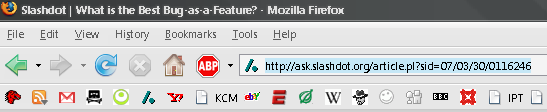
Source: Slashdot
GD Star Rating
loading...
loading...
About Hardono

Howdy! I'm Hardono. I am working as a Software Developer. I am working mostly in Windows, dealing with .NET, conversing in C#. But I know a bit of Linux, mainly because I need to keep this blog operational. I've been working in Logistics/Transport industry for more than 11 years.


Incoming Search
browser