Posts RSS Comments RSS 129 Posts and 246 Comments till now

Archive for April, 2008

Questions To Be Pondered on Your Software Development

I was reading Alik Levin’s Blog which linked to an interesting article about increasing the performance of .NET application. The interesting questions are:

  • How to cache data?
  • How to handle communications?
  • How to handle concurrency?
  • How to handle components’ coupling/cohesion?
  • How to perform data access?
  • What algorithms to use?
  • How to handle exceptions?
  • How to handle resource management?
  • How to handle state management?

*read the article HERE

I strongly agree that every developer in any development Team should remember these questions (and know how to answer it, of course :D) by heart. And able take them as a consideration. My favorite donkey-bridge to these question is A-4C-D-E-R-S (Algorithm, Cache, Communication, Concurrency, Coupling, Data Access, Exceptions, Resource and State Management)

Even better if not best, if you could implement the answers to above questions as a standard framework for your development team. ;)

How To Draw Diamond Recursively

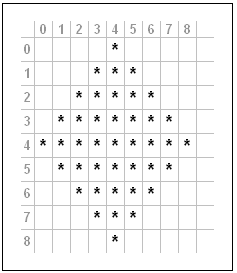
I had this interesting challenge from my colleague. He asked me to draw diamond recursively (not really draw, but plot using command line program :D). I managed to draw the 3×3 diamond, but I didn’t satisfied with my program. So I put more thought on it, and make it more interesting by allow us to define the width and the height of the diamond.

namespace ConsolePrograms
{
    class DrawDiamond
    {
        static void Main(string[] args)
        {
            Console.WriteLine("1 Diamond, Width=7, Height=5");
            SetupDiamond(1, 7, 5);
            Console.WriteLine("4 Diamond, Width=3, Height=5");
            SetupDiamond(4, 3, 5);
            Console.WriteLine("9 Diamond, Width=3, Height=3");
            SetupDiamond(9, 3, 3);
            Console.WriteLine("16 Diamond, Width=7, Height=7");
            SetupDiamond(16, 7, 7);
        }

        static void SetupDiamond(int NumberOfDiamonds, int Width, int Height)
        {
            //NumberOfDiamonds must be a Perfect Square
            if (((int)Math.Pow(Math.Sqrt(NumberOfDiamonds),2.0)) != NumberOfDiamonds)
                return;

            //Width and Height must be an odd number bigger than 1
            if (Width % 2 != 1 || Height % 2 != 1)
                return;

            int actualWidth = (int)Math.Sqrt(NumberOfDiamonds) * Width
                - ((int)Math.Sqrt(NumberOfDiamonds)-1) ;

            int actualHeight = (int)Math.Sqrt(NumberOfDiamonds) * Height
                - ((int)Math.Sqrt(NumberOfDiamonds)-1);

            int midWidth = (actualWidth - (actualWidth % 2)) / 2;
            int midHeight = (actualHeight - (actualHeight % 2)) / 2;

            Char[][] arCharacters = new Char[actualWidth ][];
            for (int i = 0; i < actualWidth; i++)
                arCharacters[i] = new Char[actualHeight];

            for (int i = 0; i < actualWidth; i++)
                for (int j = 0; j < actualHeight; j++)
                    arCharacters[i][j] = '.';

            DrawDiamond(midWidth, 0, (Width-1)/2,
                (Height-1)/2, midWidth, midHeight,
                actualWidth, actualHeight,
                ref arCharacters);

            for (int i = 0; i < actualHeight ; i++)
            {
                for (int j = 0; j < actualWidth; j++)
                    Console.Write(arCharacters[j][i]);
                Console.WriteLine();
            }
        }

        public static void DrawDiamond(int x, int y, int Width,
            int Height, int midWidth, int midHeight,
            int actualWidth, int actualHeight,
            ref Char[][] arCharacters)
        {
            if (x < 0 || x >= actualWidth)
                return;

            if (y >= actualHeight)
                return;

            arCharacters[x][y] = ‘*’;

            if (x < midWidth && y < midHeight)
            {
                DrawDiamond(x - Width, y + Height, Width,
                    Height, midWidth, midHeight,
                    actualWidth, actualHeight,
                    ref arCharacters);
            }
            else if (x > midWidth && y < midHeight)
            {
                DrawDiamond(x + Width, y + Height, Width,
                    Height, midWidth, midHeight,
                    actualWidth, actualHeight,
                    ref arCharacters);
            }
            else if (x < midWidth && y > midHeight)
            {
                DrawDiamond(x + Width, y + Height, Width,
                    Height, midWidth, midHeight,
                    actualWidth, actualHeight,
                    ref arCharacters);
            }
            else if (x > midWidth && y > midHeight)
            {
                DrawDiamond(x - Width, y + Height, Width,
                    Height, midWidth, midHeight,
                    actualWidth, actualHeight,
                    ref arCharacters);
            }
            else if (x == midWidth)
            {
                DrawDiamond(x - Width, y + Height, Width,
                    Height, midWidth, midHeight,
                    actualWidth, actualHeight,
                    ref arCharacters);
                DrawDiamond(x + Width, y + Height, Width,
                    Height, midWidth, midHeight,
                    actualWidth, actualHeight,
                    ref arCharacters);
                DrawDiamond(x, y + (Height*2), Width,
                    Height, midWidth, midHeight,
                    actualWidth, actualHeight,
                    ref arCharacters);
            }
            else if (x < midWidth && y == midHeight)
            {
                DrawDiamond(x + Width, y + Height, Width,
                    Height, midWidth, midHeight,
                    actualWidth, actualHeight,
                    ref arCharacters);
            }
            else if (x > midWidth && y == midHeight)
                DrawDiamond(x - Width, y + Height, Width,
                    Height, midWidth, midHeight,
                    actualWidth, actualHeight,
                    ref arCharacters);
            return;
        }
    }
}

Ouch, Sodeve.NET Trackback is filtered by Akismet

sodeve.png

Mr. Akismet filtered my trackback, to my own post .. hehe.. hmm.. my BlogWalking Pilot Episode seems to be the first, and the last …

Using Serialization To Measure .NET DataSet Size

In my previous post, I did commented that serialization could do the trick to measure the size of a DataSet object.


I am using both BinaryFormatter and SoapFormatter this time, the code is as follows:

using System;
using System.Collections.Generic;
using System.Data;
using System.IO;
using System.Text;
using System.Runtime.Serialization;
using System.Runtime.Serialization.Formatters.Soap;
using System.Runtime.Serialization.Formatters.Binary;

namespace ConsoleApplication1
{
    class Program
    {
        public static int MeasureDataSetByXML(DataSet ds)
        {
            String firstXML = ds.GetXml();
            UnicodeEncoding uniEnc = new UnicodeEncoding();
            return uniEnc.GetByteCount(firstXML);
        }

        public static long MeasureDataSetByBinaryFormatter(DataSet ds)
        {
            return MeasureDataSetSerialization(ds, new BinaryFormatter());
        }

        public static long MeasureDataSetBySoapFormatter(DataSet ds)
        {
            return MeasureDataSetSerialization(ds, new SoapFormatter());
        }

        public static long MeasureDataSetSerialization(DataSet ds, IFormatter formatter)
        {
            FileInfo firstFile = new FileInfo("Test.txt");

            if (firstFile.Exists)
                firstFile.Delete();

            FileStream firstStream = firstFile.OpenWrite();

            //Try Serialize
            try
            {
                formatter.Serialize(firstStream, ds);
                firstStream.Flush();
                firstStream.Close();
            }
            catch (Exception ex)
            {
                Console.WriteLine("Failed to Serialized. Reason: " + ex.Message);
            }
            //Refresh the FileInfo
            firstFile.Refresh();
            return firstFile.Length;
        }

        static void Main(string[] args)
        {
            //Prepare the Data
            DataSet ds = new DataSet();
            Random r = new Random();
            DataTable dt = new DataTable("TestTable");
            for (int i = 1; i <= 10; i++)
            {
                dt.Columns.Add(new DataColumn("Column_" + i.ToString()));
            }
            dt.AcceptChanges();
            for (int i = 0; i < 10; i++)
            {
                DataRow dr = dt.NewRow();
                foreach (DataColumn dc in dt.Columns)
                {
                    dr[dc.ColumnName] = r.Next(int.MinValue, int.MaxValue).ToString();
                }
                dt.Rows.Add(dr);
            }
            dt.AcceptChanges();
            ds.Tables.Add(dt);
            DataSet firstDataSet = ds.Copy();           

            //Double the Size
            DataTable dt2 = dt.Copy();
            dt2.TableName = "TsetTable";
            ds.Tables.Add(dt2);
            DataSet secondDataSet = ds.Copy();

            Console.WriteLine("DataSet with One Table, measure based on XML: {0} bytes", MeasureDataSetByXML(firstDataSet));
            Console.WriteLine("DataSet with One Table, measure based on Binary Formatter: {0} bytes", MeasureDataSetByBinaryFormatter(firstDataSet));
            Console.WriteLine("DataSet with One Table, measure based on SOAP Formatter: {0} bytes", MeasureDataSetBySoapFormatter(firstDataSet));

            Console.WriteLine("DataSet with Duplicate Tables, measure based on XML: {0} bytes", MeasureDataSetByXML(secondDataSet));
            Console.WriteLine("DataSet with Duplicate Tables, measure based on Binary Formatter: {0} bytes", MeasureDataSetByBinaryFormatter(secondDataSet));
            Console.WriteLine("DataSet with Duplicate Tables, measure based on SOAP Formatter: {0} bytes", MeasureDataSetBySoapFormatter(secondDataSet));

            Console.ReadLine();
        }
    }
}
/* Execution Result: (result may varies with your own run)

DataSet with One Table, measure based on XML: 8086 bytes
DataSet with One Table, measure based on Binary Formatter: 5851 bytes
DataSet with One Table, measure based on SOAP Formatter: 9064 bytes
DataSet with Duplicate Tables, measure based on XML: 16118 bytes
DataSet with Duplicate Tables, measure based on Binary Formatter: 10823 bytes
DataSet with Duplicate Tables, measure based on SOAP Formatter: 16412 bytes

*/


What do you think? Which one is the closest to the actual usage of a DataSet object?
Well, I can’t say about the actual RAM usage, but if you are measuring the size of DataSet that you passed to a Web Service, my money is with MeasureDataSetBySoapFormatter

How To Determine The Size of .NET DataSet Object in Bytes

Apparently there is no way I haven’t find a way to determine the size of a .NET managed object in memory. The closest I can come out, particularly for a DataSet object is as follows:

DataSet ds = new DataSet();
// ...
// This is where you populate the content of DataSet
// ...
String xmlContent = ds.GetXml();
UnicodeEncoding uniEnc = new UnicodeEncoding();
int byteCount = uniEnc.GetByteCount(xmlContent);

But why we use UnicodeEncoding, not ASCIIEncoding, or UTF8Encoding, well, as MSDN says, String object is a collection of Unicode characters. So if we want to know how many bytes are they, we need to use UnicodeEncoding.

Of course we are still far from our actual objective, but this is a good start. I’ll update as I found other possible method.

Close
E-mail It
Socialized through Gregarious 42