2009
08.05

How to Combine Different Excel Charts

A colleague asked for my help yesterday. He wants to have a chart that consists of bar chart and smooth-line chart. Since I don’t rate my MS Excel skill highly, I told him to give me some time to do simulation (read: Trial-and-Error)

Assume we have the following data:


Jan

Feb

Mar

Apr

Sales 2008

12

56

90

34

Sales 2009

23

87

43

83

Overtime 2008

23

45

37

68

Overtime 2009

11

32

43

12

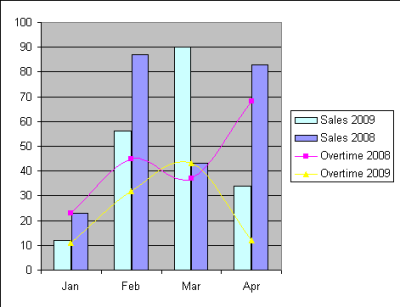
Below is the final result that he wanted:
excel-chart

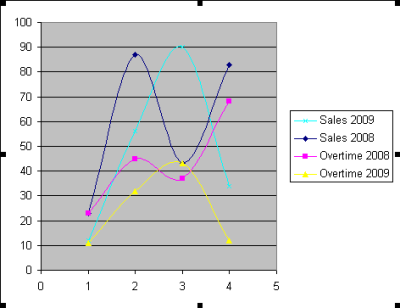
To do that, first we need to plot the data as XY (Scatter) – Smooth Line chart. I assume you know how to plot chart with data series. By now, we should have this:
excel-chart2

Select one of the series that you want to change into bar chart. You can do that by clicked the series’ line in the chart, or open the chart toolbar.

excel-chart3

It’s a simple trick that I only know about it yesterday :D . I hope you will find it useful.


Possibly Related Posts


Incoming Search Term

excel charts (6), smooth data excel (3), xy scatter chart with multiple data series (3), excel XY SCATTER chart EXAMPLE (2), combining different graphs using excel (2), excel chart (2), combining graphs in excel (2), line chart excel (1), line graph excel (1), merging x - y graphs in excel (1), old excel graph (1), smooth line chart (1), a xy scatter graph (1), Smooth line graph (1), smooth line graph VB code (1), xy chart (1), how to plot graph in excel (1), how to merge x-y scatter chart (1), how to combine graphs with difference on excel (1), chart excel (1), charts in excel (1), combine scatter and column chart (1), excel chart merge (1), excel charts merge (1), excel compare percentages graph (1), excel graphs (1), excel line charts (1), excel merge charts scatter and bar (1), guideline to make combined line (1), XY(scatter) chart of ms excel (1)

Advertise Here

No Comment

Add Your Comment

* Copy this password:

* Type or paste password here: