My HR colleague called me this morning because she’s having problem with Inland Revenue Authority of Singapore (IRAS) Validation and Submission Java Application (JNLP) which can be found HERE.
The error window that she had was:

click Details to view the Exception:

To solve this issue, you need to do the following steps:
- Remove the proxy settings (optional). There’s a chance that the your HTTP Proxy server is caching the outdated version of the applet
- Clear your Java cache. Go to Control Panel – Java.
 click Settings, then click Delete Files.
 - Set JNLP File/MIME Association. In Java Cotrol Panel, click Advanced tab. Expand JNLP File/MIME Association. Select Promp User.

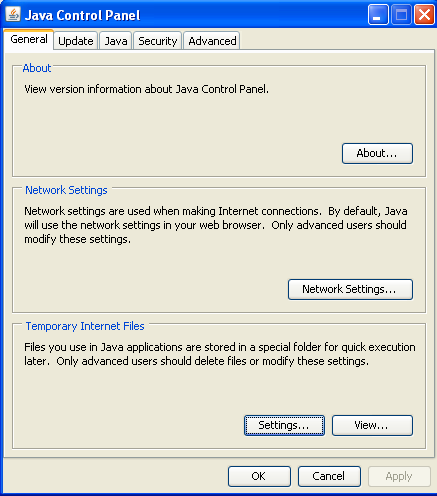 click Settings, then click Delete Files.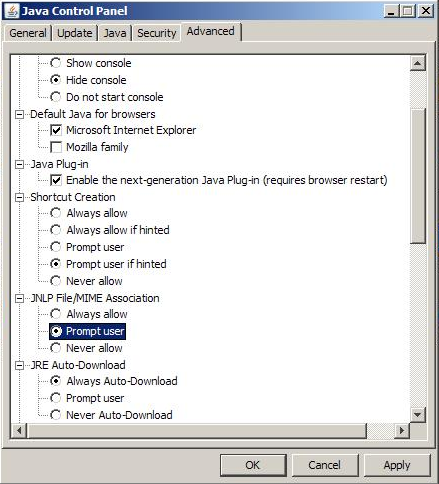
You should by now fixed the issue. When you launched the Java Application you should have the following prompt:

Click Run, and you are set to validate your Employment Income submission.
If it’s still not working, drop a comment and we’ll see what we can do ;).
About Hardono

Howdy! I'm Hardono. I am working as a Software Developer. I am working mostly in Windows, dealing with .NET, conversing in C#. But I know a bit of Linux, mainly because I need to keep this blog operational. I've been working in Logistics/Transport industry for more than 11 years.



 My recent project was a web project that connects the logistics needs of Richland’s customers with Richland’s logistics system. The project’s UI is using
