browse by category or date

I had this interesting challenge from my colleague. He asked me to draw diamond recursively (not really draw, but plot using command line program :D). I managed to draw the 3×3 diamond, but I didn’t satisfied with my program. So I put more thought on it, and make it more interesting by allow us to define the width and the height of the diamond.
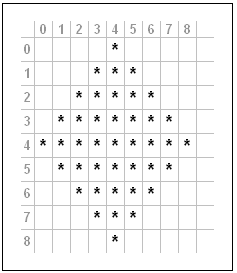
namespace ConsolePrograms
{
    class DrawDiamond
    {
        static void Main(string[] args)
        {            
            Console.WriteLine("1 Diamond, Width=7, Height=5");
            SetupDiamond(1, 7, 5);
            Console.WriteLine("4 Diamond, Width=3, Height=5");
            SetupDiamond(4, 3, 5);
            Console.WriteLine("9 Diamond, Width=3, Height=3");
            SetupDiamond(9, 3, 3);
            Console.WriteLine("16 Diamond, Width=7, Height=7");
            SetupDiamond(16, 7, 7);
        }

        static void SetupDiamond(int NumberOfDiamonds, int Width, int Height)
        {
            //NumberOfDiamonds must be a Perfect Square
            if (((int)Math.Pow(Math.Sqrt(NumberOfDiamonds),2.0)) != NumberOfDiamonds)
                return;

            //Width and Height must be an odd number bigger than 1
            if (Width % 2 != 1 || Height % 2 != 1)
                return;

            int actualWidth = (int)Math.Sqrt(NumberOfDiamonds) * Width 
                - ((int)Math.Sqrt(NumberOfDiamonds)-1) ;

            int actualHeight = (int)Math.Sqrt(NumberOfDiamonds) * Height 
                - ((int)Math.Sqrt(NumberOfDiamonds)-1);

            int midWidth = (actualWidth - (actualWidth % 2)) / 2;
            int midHeight = (actualHeight - (actualHeight % 2)) / 2;

            Char[][] arCharacters = new Char[actualWidth ][];
            for (int i = 0; i < actualWidth; i++)
                arCharacters[i] = new Char[actualHeight];

            for (int i = 0; i < actualWidth; i++)
                for (int j = 0; j < actualHeight; j++)
                    arCharacters[i][j] = '.';
           
            DrawDiamond(midWidth, 0, (Width-1)/2, 
                (Height-1)/2, midWidth, midHeight, 
                actualWidth, actualHeight, 
                ref arCharacters);

            for (int i = 0; i < actualHeight ; i++)
            {
                for (int j = 0; j < actualWidth; j++)
                    Console.Write(arCharacters[j][i]);
                Console.WriteLine();
            }
        }

        public static void DrawDiamond(int x, int y, int Width, 
            int Height, int midWidth, int midHeight, 
            int actualWidth, int actualHeight, 
            ref Char[][] arCharacters)
        {             
            if (x < 0 || x >= actualWidth)
                return;
            
            if (y >= actualHeight)
                return;

            arCharacters[x][y] = '*';

            if (x < midWidth && y < midHeight)
            {
                DrawDiamond(x - Width, y + Height, Width, 
                    Height, midWidth, midHeight, 
                    actualWidth, actualHeight, 
                    ref arCharacters);
            }
            else if (x > midWidth && y < midHeight)
            {
                DrawDiamond(x + Width, y + Height, Width, 
                    Height, midWidth, midHeight, 
                    actualWidth, actualHeight, 
                    ref arCharacters);
            }
            else if (x < midWidth && y > midHeight)
            {
                DrawDiamond(x + Width, y + Height, Width, 
                    Height, midWidth, midHeight, 
                    actualWidth, actualHeight, 
                    ref arCharacters);
            }
            else if (x > midWidth && y > midHeight)
            {
                DrawDiamond(x - Width, y + Height, Width, 
                    Height, midWidth, midHeight, 
                    actualWidth, actualHeight, 
                    ref arCharacters);
            }
            else if (x == midWidth)
            {
                DrawDiamond(x - Width, y + Height, Width, 
                    Height, midWidth, midHeight, 
                    actualWidth, actualHeight, 
                    ref arCharacters);
                DrawDiamond(x + Width, y + Height, Width,
                    Height, midWidth, midHeight, 
                    actualWidth, actualHeight, 
                    ref arCharacters);
                DrawDiamond(x, y + (Height*2), Width, 
                    Height, midWidth, midHeight, 
                    actualWidth, actualHeight, 
                    ref arCharacters);
            }
            else if (x < midWidth && y == midHeight)
            {
                DrawDiamond(x + Width, y + Height, Width, 
                    Height, midWidth, midHeight, 
                    actualWidth, actualHeight, 
                    ref arCharacters);
            }
            else if (x > midWidth && y == midHeight)
                DrawDiamond(x - Width, y + Height, Width, 
                    Height, midWidth, midHeight, 
                    actualWidth, actualHeight, 
                    ref arCharacters);
            return;
        }
    }
}

About Hardono

Howdy! I'm Hardono. I am working as a Software Developer. I am working mostly in Windows, dealing with .NET, conversing in C#. But I know a bit of Linux, mainly because I need to keep this blog operational. I've been working in Logistics/Transport industry for more than 11 years.


Possibly relevant:

sodeve.png

Mr. Akismet filtered my trackback, to my own post .. hehe.. hmm.. my BlogWalking Pilot Episode seems to be the first, and the last …

About Hardono

Howdy! I'm Hardono. I am working as a Software Developer. I am working mostly in Windows, dealing with .NET, conversing in C#. But I know a bit of Linux, mainly because I need to keep this blog operational. I've been working in Logistics/Transport industry for more than 11 years.

Possibly relevant:

In my previous post, I did commented that serialization could do the trick to measure the size of a DataSet object.

I am using both BinaryFormatter and SoapFormatter this time, the code is as follows:

using System;
using System.Collections.Generic;
using System.Data;
using System.IO;
using System.Text;
using System.Runtime.Serialization;
using System.Runtime.Serialization.Formatters.Soap;
using System.Runtime.Serialization.Formatters.Binary;

namespace ConsoleApplication1
{
    class Program
    {
        public static int MeasureDataSetByXML(DataSet ds)
        {
            String firstXML = ds.GetXml();
            UnicodeEncoding uniEnc = new UnicodeEncoding();
            return uniEnc.GetByteCount(firstXML);
        }

        public static long MeasureDataSetByBinaryFormatter(DataSet ds)
        {
            return MeasureDataSetSerialization(ds, new BinaryFormatter());
        }

        public static long MeasureDataSetBySoapFormatter(DataSet ds)
        {
            return MeasureDataSetSerialization(ds, new SoapFormatter());
        }

        public static long MeasureDataSetSerialization(DataSet ds, IFormatter formatter)
        {
            FileInfo firstFile = new FileInfo("Test.txt");
            
            if (firstFile.Exists)
                firstFile.Delete();

            FileStream firstStream = firstFile.OpenWrite();
            
            //Try Serialize 
            try
            {
                formatter.Serialize(firstStream, ds);
                firstStream.Flush();
                firstStream.Close();
            }
            catch (Exception ex)
            {
                Console.WriteLine("Failed to Serialized. Reason: " + ex.Message);
            }
            //Refresh the FileInfo
            firstFile.Refresh();
            return firstFile.Length;
        }

        static void Main(string[] args)
        {
            //Prepare the Data
            DataSet ds = new DataSet();
            Random r = new Random();
            DataTable dt = new DataTable("TestTable");
            for (int i = 1; i <= 10; i++)
            {
                dt.Columns.Add(new DataColumn("Column_" + i.ToString()));
            }
            dt.AcceptChanges();
            for (int i = 0; i < 10; i++)
            {
                DataRow dr = dt.NewRow();
                foreach (DataColumn dc in dt.Columns)
                {
                    dr[dc.ColumnName] = r.Next(int.MinValue, int.MaxValue).ToString();
                }
                dt.Rows.Add(dr);
            }
            dt.AcceptChanges();
            ds.Tables.Add(dt);            
            DataSet firstDataSet = ds.Copy();           
            
            //Double the Size
            DataTable dt2 = dt.Copy();
            dt2.TableName = "TsetTable";
            ds.Tables.Add(dt2);
            DataSet secondDataSet = ds.Copy();

            Console.WriteLine("DataSet with One Table, measure based on XML: {0} bytes", MeasureDataSetByXML(firstDataSet));
            Console.WriteLine("DataSet with One Table, measure based on Binary Formatter: {0} bytes", MeasureDataSetByBinaryFormatter(firstDataSet));
            Console.WriteLine("DataSet with One Table, measure based on SOAP Formatter: {0} bytes", MeasureDataSetBySoapFormatter(firstDataSet));

            Console.WriteLine("DataSet with Duplicate Tables, measure based on XML: {0} bytes", MeasureDataSetByXML(secondDataSet));
            Console.WriteLine("DataSet with Duplicate Tables, measure based on Binary Formatter: {0} bytes", MeasureDataSetByBinaryFormatter(secondDataSet));
            Console.WriteLine("DataSet with Duplicate Tables, measure based on SOAP Formatter: {0} bytes", MeasureDataSetBySoapFormatter(secondDataSet));

            Console.ReadLine();
        }
    }
}
/* Execution Result: (result may varies with your own run)

DataSet with One Table, measure based on XML: 8086 bytes
DataSet with One Table, measure based on Binary Formatter: 5851 bytes
DataSet with One Table, measure based on SOAP Formatter: 9064 bytes
DataSet with Duplicate Tables, measure based on XML: 16118 bytes
DataSet with Duplicate Tables, measure based on Binary Formatter: 10823 bytes
DataSet with Duplicate Tables, measure based on SOAP Formatter: 16412 bytes

*/

What do you think? Which one is the closest to the actual usage of a DataSet object?
Well, I can't say about the actual RAM usage, but if you are measuring the size of DataSet that you passed to a Web Service, my money is with MeasureDataSetBySoapFormatter

About Hardono

Howdy! I'm Hardono. I am working as a Software Developer. I am working mostly in Windows, dealing with .NET, conversing in C#. But I know a bit of Linux, mainly because I need to keep this blog operational. I've been working in Logistics/Transport industry for more than 11 years.
Possibly relevant: