browse by category or date

You can use this trick to protect your Windows Form or Console application connection strings. In order to work, you need to have the database information under ConnectionStrings section.

<connectionStrings>
    <add name="DefaultConnection" connectionString="Data Source= MyDBServer;initial catalog=MyDatabase;user id=MyUserId;password=MyPassword;" providerName="System.Data.SqlClient" />
    <add name="PostalCodeEntities" connectionString="metadata=res://*/PostalCodeModel.csdl|res://*/PostalCodeModel.ssdl|res://*/PostalCodeModel.msl;provider=System.Data.SqlClient;provider connection string=&quot;data source=MyDBServer;initial catalog=MyDatabase;persist security info=True;user id=MyUserId;password=MyPassword;MultipleActiveResultSets=True;App=EntityFramework&quot;" providerName="System.Data.EntityClient" />    
</connectionStrings>

Add the following method in Program.cs file

using System.Configuration;
using System.Reflection;

//.... 

private static void SecureConfig()
{
	var name = "";
	if (Environment.GetCommandLineArgs().Length > 0)
		name = Environment.GetCommandLineArgs()[0];
	else
		name = Assembly.GetExecutingAssembly().CodeBase;
	if (!name.ToLower().EndsWith(".exe"))
		name = name + ".exe";
	if (!name.Contains(Environment.CurrentDirectory))
		name = Environment.CurrentDirectory + "\\" + name;

	var reader = ConfigurationManager.OpenExeConfiguration(name);
	var section = reader.GetSection("connectionStrings");
	if (!section.SectionInformation.IsProtected)
	{
		section.SectionInformation.ProtectSection("DataProtectionConfigurationProvider");
	}
	reader.Save();
}

//.... 

Then call above method in your Main before you do anything else.

Example in Windows Form application:

using System;
using System.Windows.Forms;
using System.Configuration;
using System.Reflection;

namespace MyNamespace
{
	static class Program
	{        
		/// 
		/// The main entry point for the application.
		///        

		[STAThread]
		static void Main()
		{            
			SecureConfig();
			Application.EnableVisualStyles();
			Application.SetCompatibleTextRenderingDefault(false);
			Application.Run(new Form1()); 
		}
		
		private static void SecureConfig()
		{
			// Code as shown above ....
		}
	}
}

You can add this to any of your existing program. Once you executed the program once, the ConnectionStrings content will become something like this

<connectionStrings configProtectionProvider="DataProtectionConfigurationProvider">
	<EncryptedData>
	  <CipherData>
		<CipherValue>....Very Long Base64 String ...=</CipherValue>
	  </CipherData>
	</EncryptedData>
</connectionStrings>

I hope it helps, cheers!

About Hardono

Howdy! I'm Hardono. I am working as a Software Developer. I am working mostly in Windows, dealing with .NET, conversing in C#. But I know a bit of Linux, mainly because I need to keep this blog operational. I've been working in Logistics/Transport industry for more than 11 years.


Possibly relevant:

In my company we have GitLab 7.11 running on Ubuntu Ubuntu 14.04.1 LTS. Recently we found out that the email notifications wasn’t sent out. After confirming that the IP address is in the SMTP server’s sender whitelist, I began exploring GitLab’s mail configuration.

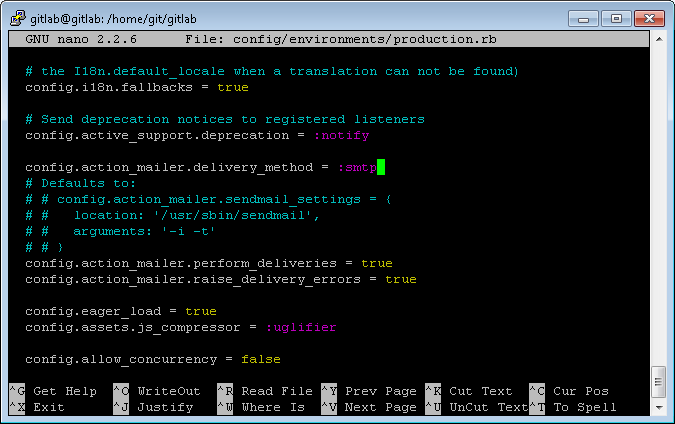
In GitLab’s installation folder, open config/environments/production.rb. Find config.action_mailer.delivery_method and change its value to :smtp

nano-gitlab-environment

Next, we need to create the smtp config file. Fortunately, GitLab has the sample config file. Run this command to create the config:

$ cp config/initializers/smtp_settings.rb.sample config/initializers/smtp_settings.rb

Now edit smtp_settings.rb

if Rails.env.production?
  Gitlab::Application.config.action_mailer.delivery_method = :smtp

  ActionMailer::Base.smtp_settings = {
    address: "email.server.com",
    port: 456,
    user_name: "smtp",
    password: "123456",
    domain: "gitlab.company.com",
    authentication: :login,
    enable_starttls_auto: true
  }
end

Since my Exchange is using sender whitelist with no authentication required, my config is very simple:

if Rails.env.production?
  Gitlab::Application.config.action_mailer.delivery_method = :smtp

  ActionMailer::Base.smtp_settings = {
    address: "192.168.1.200", # My SMTP IP Address
    port: 25
  }
end

After saving the config, restart both GitLab and Nginx

$ sudo service gitlab restart
$ sudo service nginx restart

Lastly, test whether the notification out by remove, then add back user to a project. At any case that the email delivery failed, you can view the error message at GitLab’s Admin Area – Background Jobs.

Oh, and if you need for more information on the SMTP configuration, you can refer to this documentation.

I hope it helps, cheers!

About Hardono

Howdy! I'm Hardono. I am working as a Software Developer. I am working mostly in Windows, dealing with .NET, conversing in C#. But I know a bit of Linux, mainly because I need to keep this blog operational. I've been working in Logistics/Transport industry for more than 11 years.
Possibly relevant:

Bad news: You can’t!
Good news: We can work around it, assuming that you are:

  1. a web developer trying to test your website in its eventual domain name
  2. able to ping the IP address, but the browser unable to resolve the host name

The trick is we modify the Http Header’s Host value, then browse the IP address directly.

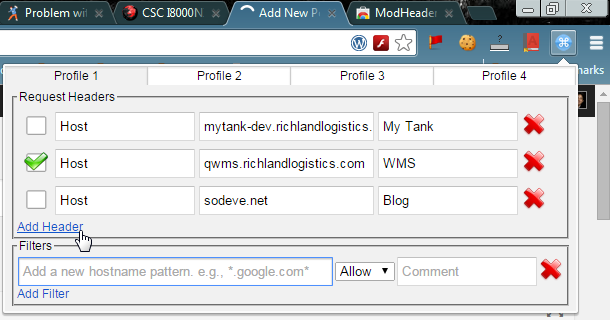
In Google Chrome, we can do this by using this plugin: ModHeader

Here’s how it looks like:

mod-headers

This way you can have many entries, and activate only one that you need. Don’t forget to deactivate all entries once you finished testing. If not, your browser won’t work.

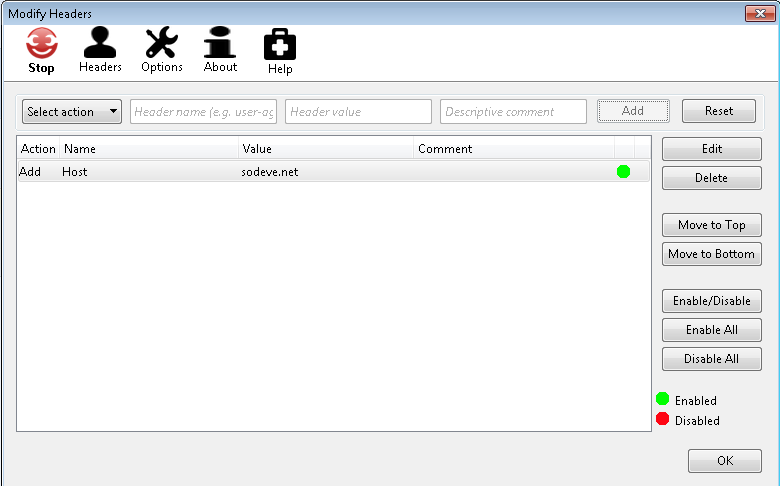
If you’re using Firefox, you can use this extension: Modify Headers. This plugin offers more functionalities such as Start/Stop the Headers modification, enabling/disabling individual Header entries, etc.

modify-header-firefox

If you’re using Opera, Safari or Internet Explorer, you might want to use Fiddler. It’s all-in-on suite to debug http traffic, which I personally found it an overkill since what we want is just to modify the Http Headers 🙂 Too bad I’m still unable to find plugin/addons similar to what Chrome and Firefox has. Let me know if you find one.

About Hardono

Howdy! I'm Hardono. I am working as a Software Developer. I am working mostly in Windows, dealing with .NET, conversing in C#. But I know a bit of Linux, mainly because I need to keep this blog operational. I've been working in Logistics/Transport industry for more than 11 years.
Possibly relevant: